Pujie Watch Faces - Wear OS 6
- 4.5
- Rating
- 100.00K
- Installs
- Free
- Price
 Analysis by App-foxy
I usually notice a watch face for its first impression: a bold color, a clever layout, or a complication that makes the screen feel more personal. After a few days, though, the question changes. Does it still help me, or am I only opening the customization screen because the novelty has not worn off yet? Pujie Watch Faces - Wear OS 6 approaches that problem as a personalization app from developer Pujie, built around creating and browsing faces for compatible Wear OS 6 smartwatches. It is free to start, aimed at Everyone, and includes optional purchases ranging from $1.99 to $15.99 per item.
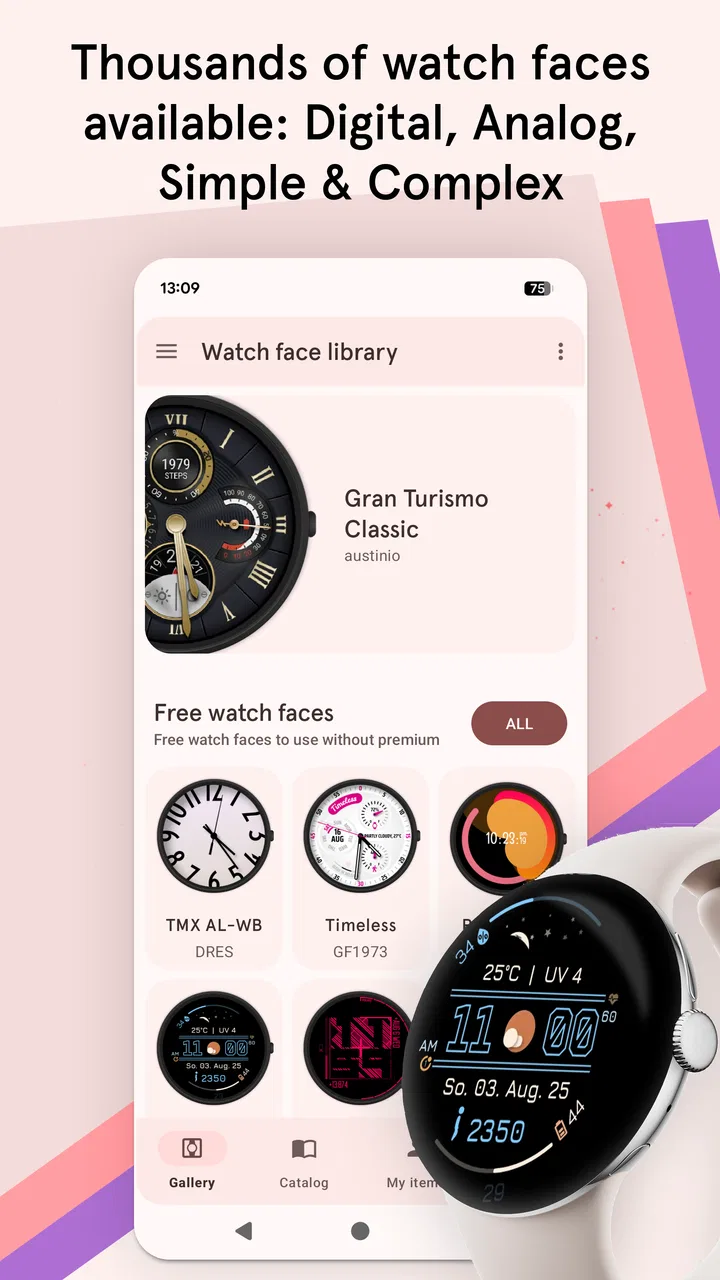
My first-week impression is positive because the app gives the watch a stronger sense of ownership than the standard face collection usually does. The store summary points to a watch face maker and a large selection of faces, but the more important distinction is that this is not only a gallery. I can treat the watch as a small design project, choose a look for a particular routine, and then decide whether that design remains useful when I stop actively thinking about it. That difference makes the app more interesting than a simple face-switching utility.
From first-week excitement to a daily watch habit
I use the first-week excitement as a chance to notice what actually earns a place on my wrist: a face that stays comfortable to read, suits the day, and does not ask for constant tweaking. That shift from experimenting to relying on a choice is where a watch-face maker proves its practical value. Next, I look at how readability and navigation affect that decision.
You May Also Like

 Blood Strike: 2.5 Anniversary
Blood Strike’s Loadouts Turn Every Drop Into a Tactical Gamble
A close look at Blood Strike’s custom loadouts: how fast access to signature weapons reshapes its battle royale rhythm, rewards preparation, and narrows the gap between fights.

 Pandora - Music & Podcasts
Pandora’s Music Is Easy to Start, but Harder to Recover
Pandora’s strength is its low-effort path from a seed to a station. Its weak spot is how much confidence it asks you to place in connection, setup, and quiet recovery.

 8 Ball Pool
8 Ball Pool Is Built on Rivalries, Rematches, and Routine
A close look at the rivalries, rematches, shared routines, and unanswered safety questions that turn a quick pool match into a persistent mobile community.

 Samsung Music
Samsung Music’s Quiet Strength Is Playing What You Already Own
Its reach comes less from spectacle than from dependable access to a personal library. That simplicity is both the app’s strongest retention engine and its ceiling.

 AccuWeather: Weather Radar
AccuWeather Review: A Quick, Clear Forecast for Everyday Decisions
For everyday plans, the best forecast is the one you can understand quickly. AccuWeather makes rain timing, radar, and local conditions easy to act on, with a few trade-offs.

 Hill Climb Racing
Why Hill Climb Racing Still Turns Crashes Into One More Run
A tiny car, a bumpy hill and one more upgrade: Hill Climb Racing keeps resurfacing because its simple chaos makes every near-miss feel personal.
More From Our News Desk



A flexible starting point for different kinds of users
The app makes the most sense for people who regard their smartwatch as part of their clothing, workspace, or daily routine. If I change between a clean face for work, a more expressive one for weekends, and a practical layout for exercise, a watch face maker offers more control than the default options. It also suits anyone who has tried several built-in faces and found that each one gets one important detail right while leaving another detail inconvenient.
That flexibility is also why I would not recommend it automatically to every smartwatch owner. If I want to set one face once and never touch it again, the watch’s native face picker is usually quicker and less demanding. Pujie becomes worthwhile when the ability to adjust the visual hierarchy matters: what I see immediately, what I can ignore, and what deserves a place on the limited screen.
The first useful exercise is to define the job of the face before browsing. I might need time to be instantly readable during meetings, a restrained appearance when wearing formal clothes, or more glanceable information while commuting. Without that decision, a large catalog can turn into endless scrolling. I found that choosing a purpose first makes the app feel like a tool rather than a stream of decorations.
Why the first week feels rewarding
The strongest early appeal comes from seeing a familiar watch behave differently. A face can make the same hardware feel more deliberate, particularly when the default design no longer matches my taste. I can experiment with color, density, and emphasis until the screen feels less like a generic accessory and more like something I selected for myself.
There is a subtle benefit to this experimentation: it exposes how I actually use the watch. I may think I want a face packed with information, then realize that I only look at the time and one secondary detail. Or I may prefer a quiet design at home but need more visible information when I am away from my phone. The app is useful when it helps reveal those habits instead of merely encouraging more visual change.
Browsing thousands of watch faces sounds exciting, but I would approach that promise with a filter in mind. Quantity is valuable only if I can quickly recognize what belongs to my routine. I would save a small group of candidates, wear each one through ordinary days, and judge them at a glance rather than while staring at the setup screen. A face that looks impressive in a preview can still be tiring when checked repeatedly under different lighting or during movement.
A realistic everyday scenario
Imagine a weekday in which I leave home wearing a face selected for fast reading. During the morning, I need the time without opening another screen, but I do not want a crowded design during a work conversation. At lunch, I may want a different arrangement that makes a useful secondary detail easier to notice. In the evening, I can switch to something more relaxed. The value here is not changing the face constantly; it is having a few intentional choices that match predictable parts of the day.
I would keep that rotation deliberately small. Three dependable faces are easier to remember and maintain than a collection I rarely revisit. One of my practical tips is to name each choice mentally by its purpose rather than its appearance: “work,” “quick glance,” or “weekend.” That makes it easier to return to a useful design after trying something new, and it prevents personalization from becoming another form of digital clutter.
What the free entry point means in practice
Because the app is free, I can explore its basic appeal without committing money at the start. That matters for a personalization product, since the right face depends heavily on taste and on how much time I am willing to spend adjusting the watch. The optional purchases are not a reason to avoid it, but they do change the decision: I would first establish that the editing and browsing experience fits my habits before buying anything.
I also appreciate that the age rating is Everyone, which makes the app straightforward to consider for a broad household audience. The audience is not the same as the ideal user, however. A child, a casual smartwatch owner, and a design-focused enthusiast may all be able to use it, but they will not want the same amount of choice. The app’s accessibility lowers the barrier to trying it; it does not remove the need to decide whether customization is worth the attention.
The first-week friction I would expect
The main early friction is not learning the idea of watch faces; it is resisting over-customization. When an app offers a broad range of visual directions, I can spend more time comparing designs than actually wearing one. That is especially easy when I am chasing a perfect balance between readability and style. My advice is to create a stopping rule: after finding a face that is clear, comfortable, and appropriate for the main use case, wear it for a full day before making another change.
Another practical concern is compatibility. This product is specifically positioned for Wear OS 6 smartwatches, so I would check that my watch fits that target before planning a purchase or investing time in a detailed setup. A watch face can be attractive in a listing and still be the wrong choice if the device does not support the intended experience. This is one area where the app is more specialized than a general wallpaper or phone personalization tool.
Does it still matter after the novelty fades?
After the first month, I would judge the app less by how many faces I have tried and more by whether I still use the ones I selected. The recurring value comes from having a reliable way to adjust the watch when my needs change, not from constantly searching for something new. A seasonal change in clothing, a shift from office days to travel, or a new preference for simpler information can justify revisiting the app.
This is where Pujie has a stronger case than a fixed collection of built-in faces. The standard alternatives are convenient, and they are often the better answer for someone who values speed above all else. They can feel limited, though, when I want the watch to reflect a particular routine or visual preference. Pujie’s advantage is the ability to keep refining that relationship rather than accepting the manufacturer’s original choices as final.
At the same time, I would not confuse a large catalog with lasting usefulness. If I only change faces when I am bored, the app may become a novelty drawer. The better long-term workflow is to use it for decisions that have a reason behind them. I might create one face that prioritizes quick information, another that reduces visual noise, and a third that suits a particular style. Once those roles are covered, I can stop browsing until my routine genuinely changes.
A maintenance routine that keeps customization manageable
Personalization has a maintenance cost, even when the app itself is easy to open. Every additional face creates another decision, and every detailed layout can require attention when I want to change my priorities. I would review my active choices occasionally, remove designs I no longer wear, and avoid rebuilding a face simply because a new option looks exciting in a preview.
My most useful maintenance tip is to separate “design time” from “wearing time.” I can explore and adjust when I have a few quiet minutes, but I should not keep editing during a rushed morning. Once a face works, I want the watch to disappear into the routine. That separation preserves the benefit of customization while keeping it from becoming a daily chore.
I would also judge every face at the moment I actually need it: while walking, in a bright room, during a conversation, or when I only have a second to glance down. A design that requires concentration is less successful than a plainer one if the watch is meant to provide quick information. This is an important trade-off with any maker app, and it is easy to miss when evaluating designs only from a static preview.
Where the long-term burden appears
The burden is mainly cognitive. More control means more choices, and more choices can make the watch feel unfinished. I may keep thinking that the ideal face is one more adjustment away. That mindset can drain the practical value from the app, especially if I already spend too much time managing notifications, widgets, or other digital settings.
There is also a style fatigue problem. A face that feels distinctive during the first few days can become visually loud after repeated use. Conversely, a very minimal face may feel elegant at first but leave me reaching for the phone because it does not show enough at a glance. I would treat both reactions as useful feedback rather than immediately searching for another design. Sometimes the better fix is to simplify the current choice instead of replacing it.
The optional purchase model adds another consideration. Since the app is free with individual in-app purchases between $1.99 and $15.99, I would decide whether a paid item solves a concrete problem before spending. Paying for a face that I will abandon after a day is poor value; paying for a design or customization path that becomes part of my regular rotation is easier to justify. The right question is not whether the purchase is inexpensive in isolation, but whether it reduces future friction.
How it compares with the usual alternatives
The most obvious alternative is the watch’s built-in face library. That option wins for simplicity, predictable setup, and minimal maintenance. If I want dependable basics and do not care about making the watch feel distinctive, the native experience is probably enough. It also avoids the temptation to keep browsing when I should be getting on with my day.
A generic personalization app may offer attractive visuals, but Pujie’s identity is more closely tied to watch faces and the Wear OS 6 experience. That focus is useful when the watch itself is the object I want to personalize, rather than the phone around it. I would choose Pujie over a broader customization tool when the goal is a practical, wearable layout rather than a general change in device appearance.
There is a trade-off in choosing a specialized maker: I need to care about the watch face as a design. Someone looking only for a quick replacement may find the extra choice unnecessary. Someone who wants to shape the information hierarchy, maintain a small rotation, and revisit that setup over time is more likely to appreciate what this app is trying to do.
Who should install it, and who should skip it?
I think it is a good fit for Wear OS 6 owners who are dissatisfied with the default selection, enjoy visual experimentation, or want separate faces for different routines. It is also a sensible choice for someone who sees the smartwatch as a personal accessory rather than merely a notification screen. The free starting point makes it easier to test that interest without immediately treating customization as a major purchase.
I would skip it if I already have a built-in face that shows everything I need and I dislike spending time on appearance. I would also be cautious if I tend to collect options without using them, because a large catalog can amplify that habit. In those cases, the usual alternative is better precisely because it removes decisions. Pujie earns its place when control improves the way I use the watch, not merely when it gives me more things to look at.
My long-term verdict
The lasting appeal of Pujie Watch Faces - Wear OS 6 depends on discipline. In the first week, it is easy to enjoy the transformation from a standard watch face to something that feels chosen. Over the following months, the app proves its value only if I keep a small, useful rotation and return to customization for a reason. That makes the product less like a one-time visual upgrade and more like a workshop I visit occasionally.
The app has a solid reputation for its scale, with an average rating of 4.5 from around 2.7 thousand ratings and over 100 thousand installs. Its current version is 7.0.74f, and it was released on September 3, 2024. Those details place it as a relatively recent option for this focused category, while the free download gives curious users a low-risk way to decide whether the workflow suits them.
My recommendation is therefore specific rather than universal: try it if you want your Wear OS 6 watch to reflect distinct habits, clothing choices, or information priorities, and give yourself a limit on how many faces you keep active. The best result is not endless novelty; it is a watch face that becomes quietly useful. If that sounds like the kind of personalization you will revisit only when your routine changes, Pujie deserves lasting space. If you want a set-it-and-forget-it experience, the watch’s standard options will probably serve you better.
FAQs for Pujie Watch Faces - Wear OS 6
01What is Pujie Watch Faces - Wear OS 6?
Pujie Watch Faces is a customizable watch-face app designed for Wear OS smartwatches. It provides a collection of digital and analog designs, along with tools for changing colors, layouts, complications, backgrounds, fonts, and other visual elements. The app is aimed at users who want more control than the standard watch-face options supplied with their smartwatch.
02Which smartwatches are compatible with Pujie Watch Faces?
Compatibility mainly depends on whether your smartwatch runs Wear OS and supports third-party watch faces. The app is intended for compatible Wear OS devices, including many models from brands such as Samsung, Google, Fossil, Mobvoi, and other manufacturers. However, features can vary by model and Wear OS version, so checking the current Google Play listing and your watch’s software support is recommended before downloading.
03Can I create and customize my own watch face?
Yes. One of Pujie’s main attractions is its customization system, which allows users to adjust existing designs or create a personal layout. Depending on the selected face and device, you can modify colors, hands, indexes, backgrounds, text, widgets, complications, and information panels. The editor offers considerable flexibility, although first-time users may need some experimentation to understand every available setting.
04Does Pujie Watch Faces require a subscription or additional purchases?
The app may include free content as well as premium watch faces, advanced customization tools, or optional purchases. The exact pricing and access model can change over time, so users should review the current store description and in-app purchase information before committing. Some designs or features may require payment, while others can be tested without purchasing the complete collection.
05Will using Pujie Watch Faces affect battery life?
Like any third-party watch face, Pujie can have an impact on battery life, especially when the design uses animated elements, frequent updates, bright colors, weather information, or several active complications. The actual effect depends on your watch, screen technology, settings, and usage habits. Choosing an efficient design, reducing unnecessary complications, and using ambient-mode options can help limit additional battery consumption.
Pros
- Large catalog of customizable Wear OS watch faces
- Supports personal photos
- widgets
- colors
- and complications
- Regularly updated with new community-created designs
- Can create and save your own watch face layouts
- Works well for matching faces to different outfits or activities
Cons
- Some premium designs and features require in-app purchases
- Advanced customization may feel overwhelming for new users
- Battery usage can increase with animated or data-heavy faces
- Community quality varies
- so not every design feels polished
- Certain features may depend on Wear OS version or watch model

Pujie Watch Faces - Wear OS 6
Gallery